Category Archives: POS

We’re Living in a Mobile POS World

The tech-savvy consumers of today have a deep love for their devices…and we, as businesses, are right there with them.

Society has reached a golden age where nearly everything can be completed through the use of a cell phone. You can order a pizza, manage your bank account, and watch movies on the go. It’s no surprise that cell phones have commonly become a digital alternative to traditional POS systems.

At the end of 2015, there were more than six million mobile POS terminals being used by businesses all over the world. The popularity of these systems continues to grow on a daily basis and is changing the way companies are handling their transactions.

Mobile POS Systems like Square and Pay Pal Here, allow businesses the luxury of accepting credit card payments in locations where they ordinarily wouldn’t have been able. For instance, maybe you don’t have access to a traditional transaction terminal. Or maybe you don’t have the need for one. These mobile systems provide a sense of flexibility to business owners and employees while still offering customers the convenience of using their credit and/or debit cards.

In terms of competition, Square and Pay Pal Here are pretty comparable to one other. Each system offers a variety of different benefits that are necessary components of an ideal POS terminal.

Here are just a few of the great features you’ll receive from both of them:

Basic Hardware Needs

With Square and Pay Pal Here, all you need to get started is a smartphone or tablet. When you sign up with either of these services, you’ll receive a free basic mag strip card reader (you can upgrade to an EMV reader for a small fee.) The services also come with a free app to handle your transactions.

Amazing Operator Services

Both mobile POS services offer great features such as multiple user authorization and receipt printer compatibility. Individually, they each offer unique services that set them apart, as well:

  • Pay Pal Here has a great photo capture card acceptance method.
  • Square offers an incredibly useful offline mode that works for businesses no matter what their Internet situation is.

No Contracts or Early Termination Fees

Neither Square nor Pay Pal Here requires any sort of contract or monthly fee. You have the flexibility to change services at any point without the risk of fees and/or penalties.

Square and Pay Pal Here: Two Great Choices for Mobile POS Services

When it comes to selecting the best mobile POS service for your company, there are so many different options available. Both Square and Pay Pal have been around for quite some time and offer reliable services that you can trust. Their fantastic features provide an experience consumers can trust in, and business owners a terminal they can rely on.  So step on into this mobile era…the perfect POS service is waiting for you.

Visit our online store to view our complete selection of POS products.

Top 3 Benefits of Choosing a Cloud-Based POS System

Running a company is complex business – owners need to be concerned with a variety of day-to-day functions, such as accounting, inventory management, and marketing…just for starters.

What if you could streamline and automate a huge chunk of your operations through one unified system?

Cloud-based POS systems give you that chance…

Here are 3 of the many benefits that come with choosing cloud-based POS systems:

1. Speed & Efficiency

Most stores and establishments are sure to attract a variety of customers and clientele.

Despite these customers’ individual differences, however, there’s one thing they can all agree on…a dislike for long lines at check-out.

Making the switch to a cloud-based POS system allows your employees to work at greater speeds than ever before. They will also have more available product information which helps them better assist customers.

With increased speed, you might expect a greater number of mistakes, but that’s not the case.

Unlike traditional cash registers, cloud-based POS systems handle the bulk of the work so that employees don’t have to spend as much time worried about inventory discrepancies and sales issues.

2. Extensive Data and Reporting Capability

We’ve entered a digital age where files and paperwork are a thing of the past. POS systems have all of the capabilities needed to organize your business and automate previously time-consuming tasks.

Whether you’re interested in learning more about…

  • Sales Trends
  • Inventory
  • Or Customer Information

…cloud-based POS systems offer in-depth reports that give you greater insight into the inner workings of your business. This type of information can give you a competitive edge, reduce waste, reduce errors, and increase efficiency.

Cloud-based systems even allow you to pull up this information on your mobile device. So no matter where you are, you have direct access to all of this data.

3. Freed-Up Resources

With these advanced POS systems automating much of the work that consumed your time before, you and your staff are free to handle other business tasks.

By employing a payment processor you can trust to handle these line items with accuracy, you will have the time and confidence needed to focus on other areas of your business.

Technology is giving every business the opportunity to automate, evolve, and scale. These systems will give you the opportunity to do just that.

Visit our online store to view our complete selection of POS products.
Are New Payment Technologies Good for Retailers?

Over the years, payment processing technologies have undergone significant changes.

Today, the internet and mobile devices are causing bigger shifts than ever before. While many resist these changes, others embrace them.

Every business will be affected by new POS technologies and payment solutions, so it’s important to know which direction the industry is headed.

A Brief History of the POS Industry: From Credit Cards to Today

Beginning in the 1950s, credit cards and point-of-sale technology revolutionized the retail industry.

Since that time, we’ve seen a few major evolutions in the industry:

Credit and debit cards boosted sales for retailers.

Credit cards really took off in the 1950s and 1960s, with the establishment of a revolving credit system and the introduction of a debit card. Point-of-sale devices arrived soon after and allowed merchants and retailers to accept payments via these cards.

With these new technologies in the marketplace, the use of cash and check decreased, credit and debit payments increased, and the number of transactions also increased. Over the intervening decades, credit and debit POS systems have become standard for most retailers in the developed world.

Retailers who adopted POS technologies often saw more sales as a result.

Smartphones are poised to revolutionize the payment ecosystem even more.

Mobile wallets give customers the ability to pay directly from their smartphone, without the need for cards, cash, or checks. This new technology offers a number of benefits to customers and businesses.

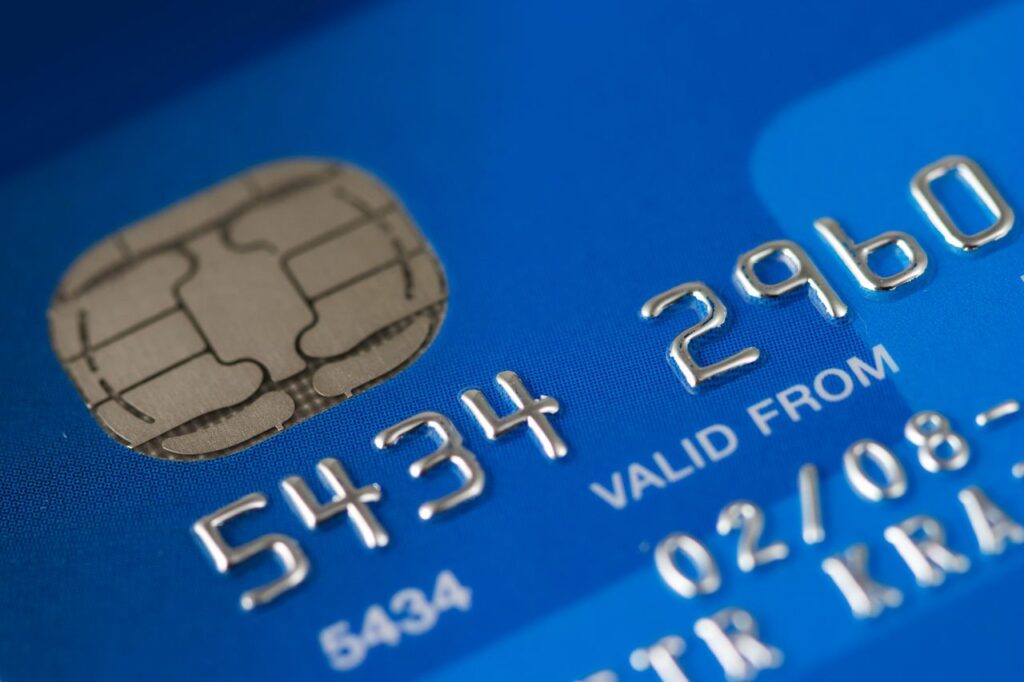
Not only are mobile wallets more convenient, some argue that they are actually more secure than credit cards. POS terminals that utilize near field communications (NFC) will allow merchants to accept payments via mobile wallets, but there are several obstacles to widespread adoption, such as upgrade costs and security concerns.

Increased rates of fraud are pushing more stringent security measures in the POS industry.

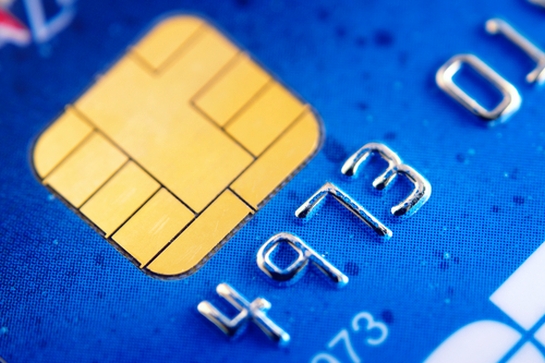
Fraud continues to be a worldwide problem. Between 2007 and 2014, credit card fraud doubled – and 37% of this fraud came in the form of counterfeit cards. EMV cards and chip-enabled POS devices are designed to fight this problem.

Another solution is the aforementioned mobile wallet. Traditional credit cards use a person’s signature as a security measure – but how often do retail staff compare card signatures against receipts? A mobile wallet that requires a fingerprint, on the other hand, is much more difficult to counterfeit.

Conclusion: Complexity Slows Adoption Rates, But Change Is Inevitable

The payment processing chain has become quite complicated and involves merchants, banks, credit card companies, software providers, and more.

Concerns over fraud, upgrade costs, profit margins, and adoption rates are preventing immediate acceptance of these new technologies.

However, as POS security systems continue improve – and the potential profits of these new technologies becomes clearer – we can expect to see another revolution in the way merchants and customers perform transactions.

Interface Differences

Nowadays, printers have millions of different ports and plugs on them that help transmit different information from a bunch of different gadgets. Here we try to help make things a little easier when trying to decide which interface is best for your printer.

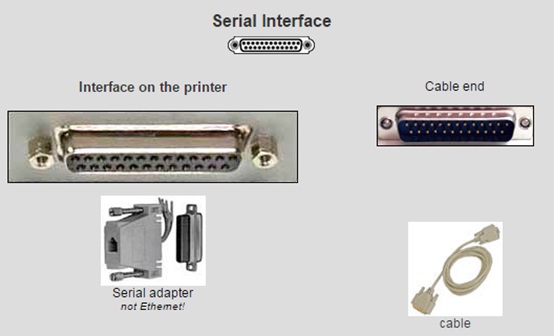
Serial Interface

Serial interfaces transfer information in or out one bit at a time. Data has been traditionally  transferred through serial ports to devices such as modems, terminals and various peripherals. Serial ports are used in applications such as industrial automation systems, scientific instruments, point of sale systems and some industrial and consumer products. Server computers may use a serial port as a control console for diagnostics. Network equipment (such as routers and switches) often use serial console for configuration. Serial ports are used in these areas as they are simple, cheap and their console functions are highly standardized and widespread. A serial port requires very little supporting software from the host system.

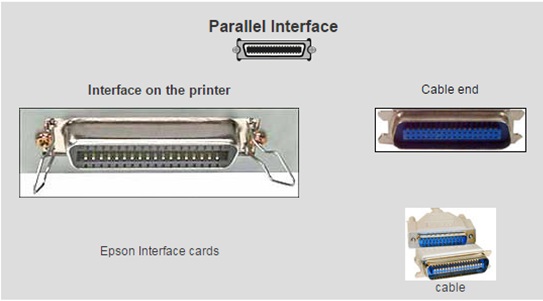
Parallel Interface

Also known as a printer port, parallel interfaces were primarily designed to operate a line printer that used IBM’s 8-bit extended ASCII character set to print text, but could also be used to adapt other peripherals. Graphical printers, along with a host of other devices, have been designed to communicate with the system.

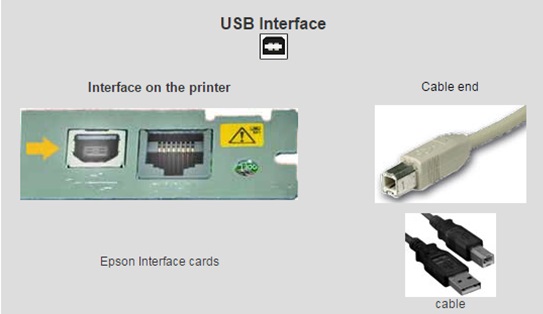
USB Interface

USB, which stands for Universal Serial Bus, is an industry standard for short-distance digital data communications. USB interfaces allows data to be transferred between devices and can also supply electric power across the cable to devices without their own power source. USB can also allow stand-alone electronic devices to be connected via cables to a computer (or to each other).

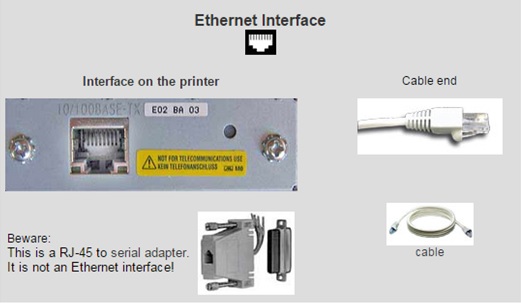
Ethernet Interface

Ethernet Networking Interface, or ENI, allows any computer on Ethernet network to access controllers allowing users to send production data, alarm messages, or status information to computers, cellular phones, or pagers capable of receiving e-mail. The ENI module allows companies to leverage existing cable, hubs, switches, and routers already installed in facilities.

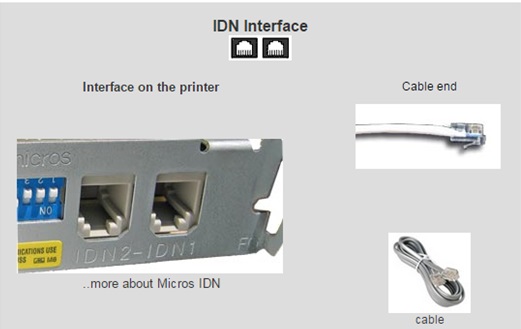
To learn more about Interface Cards, including IDN Interface Cards, please visit http://www.beaglehardware.com/micros.html#Interface_Cards.

UncategorizedNo comments

IDN Interface

The Buzz On a New Alarm System!

A POS buzzer can work as either a print or cash drawer alarm. This means that when it’s plugged into the back of any Epson TM series printer, it sends out an audible alarm whenever a slip is printed or when the cash drawer stays open for too long. Although a cash drawer is not required for the buzzer system, when used in conjunction, an alarm can be triggered when the drawer is left open for a selected period of time and then again once the drawer is closed.

These systems are compact and easy to mount which make them ideal for noisy restaurants and bars, as well as retail or other service industry environments. A POS buzzer system is easy to install and is compatible with most printers.

printalarm

To purchase a POS Buzzer, please visit http://www.beaglehardware.com/printbuzzer.html.

Visit our online store to view our complete selection of POS products.
Buyer’s Introduction to Epson POS Printers (Part 1)

Understanding Your POS Printer Needs

Before shopping for a POS printer, start by assessing your current system. Identify your operating system (Toast, Micros, Opera, Upserve, etc.) and check which printers are compatible with your software version. This prevents wasted time, incorrect purchases, and unnecessary returns.

Epson is one of the leading manufacturers of thermal POS printers. Many models are easy to install using drivers, while wireless, Bluetooth, and Ethernet models may require additional setup.

What You Need to Know

  1. Identify your current printer model.
  2. Identify your interface type (USB, Serial, Ethernet, Wireless).
  3. Confirm compatibility with your POS software.
  4. Decide whether to replace your existing model or upgrade.

If your printer is discontinued, you can choose a refurbished identical model or upgrade to a newer Epson model for long‑term stability.